 TESTED 30 Jun
MB-240 Online Practice Questions and Answers
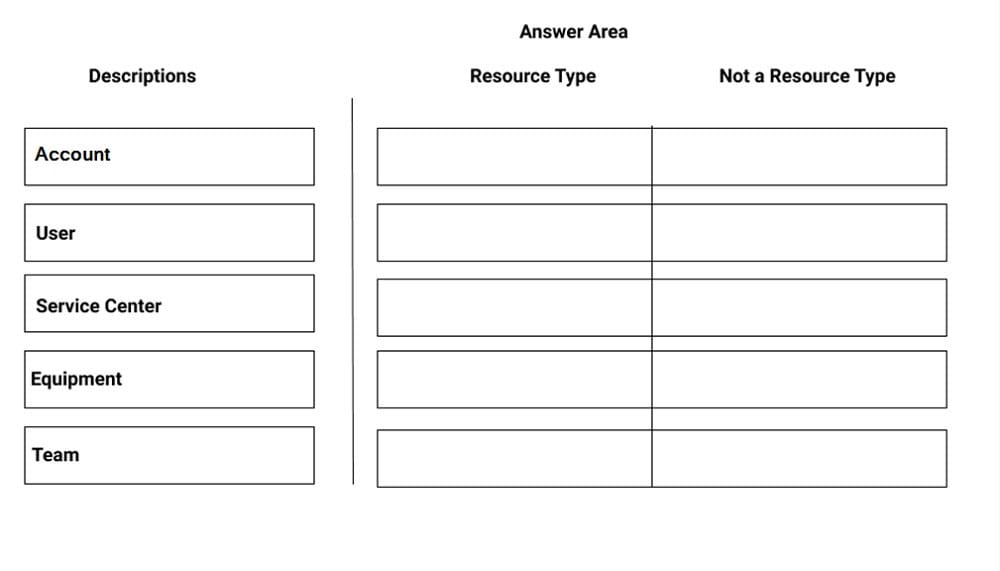
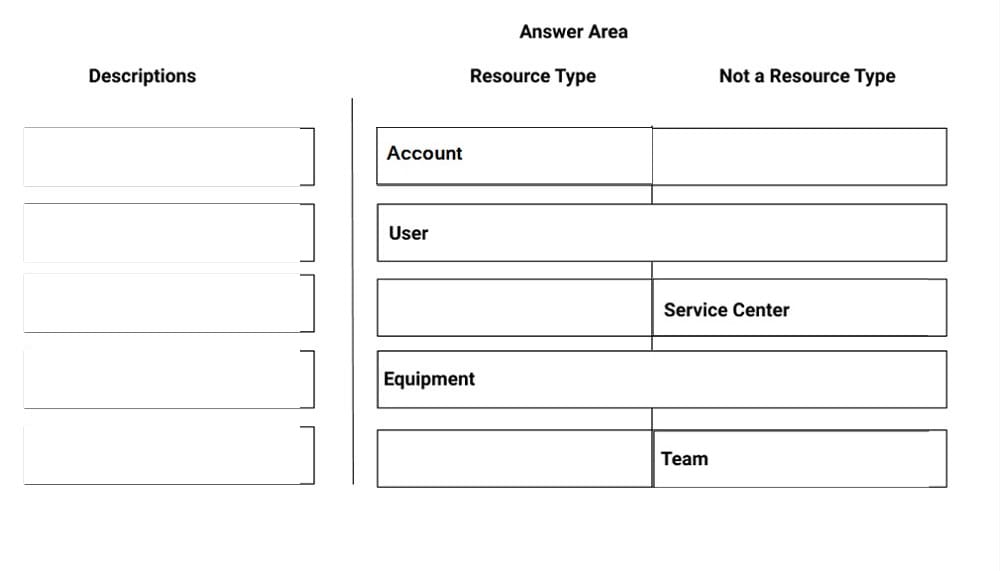
DRAG DROP
Your company has a requirement to use the out-of-the-box Resource types to categorize Active Bookable Resource types. The company wants to ensure easy Dynamics 365 upgrades as needed.
You need to ensure that you only use the appropriate Resource types.
Which types are available for your use? To answer, drag each description on the left to the appropriate column on the right. Each description may be used once, more than once, or not at all. You may need to drag the split bar between panes
or scroll to view the content.
NOTE: Each correct selection is worth one point.
Select and Place:
Your organization wants to use Connected Field Service for existing customer assets.
You install Connected Field Service and set up Azure IoT Central, but no alerts are being received in Dynamics 365 for the devices.
You need to find the issue and resolve it.
Which action should you choose?
A. Create the IoT Connected Device connection role to link devices to customer assets.
B. Register the device in Dynamics 365 Connected Field Service.
C. Configure the Create CFS alerts from IoT Central workflow within Dynamics 365.
D. Check that the Create CFS alerts from IoT Central within Microsoft Flow Automate is set up properly.
You are working for a heating, ventilation, and air conditioning (HVAC) service organization.
The field technicians in your organization are working in the Microsoft Dynamics 365 Field Service mobile app. The technicians report that they are able to access customer assets, but unable to access functional location and customer asset
hierarchy in offline mode.
You need to ensure technicians can view the functional location and customer asset hierarchy in their mobile app.
What should you do?
A. Ensure there is internet connectivity in the mobile app.
B. Add the technicians to the mobile app's offline profile.
C. Enable asset hierarchy for the mobile app.
D. Download offline data to the mobile app.
Your customer wants to update compressor temperature information in an external system called Maximo.
The update in the external system should happen if the compressor temperature reading is above 107 degrees, while the technician is performing onsite repairs.
What is the most efficient way to perform this task systematically?
A. Create Dual Write integration logic to update Maximo when the temperature reading entered is greater than 107 degrees.
B. Create a Business Process Flow on the booking to update Maximo when the temperature reading entered is greater than 107 degrees.
C. Create a Power Automate flow to update Maximo when the temperature reading entered is greater than 107 degrees.
D. Create a Business Process Flow on the work order to update Maximo when the temperature reading entered is greater than 107 degrees.
A functional consultant needs to enable Internet of Things (IoT) access.
Which two actions need to be taken? Each answer presents a complete solution.
A. Assign access to IoT entities in the Field Service – Dispatcher role.
B. Assign access to IoT entities in the Field Service – Technician role.
C. Assign access to IoT entities in the Field Service – Administrator role.
D. Add dispatchers to the Connected Field Service – Technician role.
E. Add technicians to the Connected Field Service – Technician role.
You are working with your customer to define their schedule board.
Your customer needs you to add or create additional views for their scheduling team.
Solution: Create a new view in the Bookable Resource Bookings Views. Then, edit or create a new tab on the schedule board, and update the Requirements Panel with the new view.
Does this meet the goal?
A. Yes
B. No
You are the Dynamics 365 Field Service technician manager for Contoso Ltd.
Your customers are indicating they are being double invoiced for certain work orders. They are receiving the quarterly invoice, and another invoice after the service is performed.
You need the system to automatically handle these scenarios, while still sending out invoices for work orders that are not generated from an agreement.
What should you do to avoid double billing your customers that have agreements?
A. Turn-off Invoice Generated on Closed-Posted work orders to avoid invoice generation when a work order is Closed-Posted.
B. Update the Invoice Journal lines to ensure the lines are $0.00.
C. Manually update the Invoice lines prior to sending to the customer.
D. Create a process using price lists and entitlements to ensure the work order subtotal and work order invoice is $0.00.
You are a consultant implementing Dynamics 365 Field Service for Contoso Manufacturing.
The Field Service director wants to set preventive maintenance schedules for sub-components that have a different maintenance routine than the top-level or parent asset.
The goal is to increase asset useful life and provide increased customer satisfaction.
How should you manage different preventive maintenance schedules for multiple sub-components of a parent or top-level asset?
A. Create Asset Properties, and associate the appropriate new Asset Property schedule to each sub-component.
B. Create an Agreement for each Asset Sub-Component to ensure the proper preventive maintenance schedule is set.
C. Create Asset Categories for each preventive maintenance schedule, and assign to the appropriate sub-component.
D. Associate an Agreement Booking Incident to the Asset Sub-Component requiring a different preventive maintenance schedule.
Work Orders, once completed and reviewed, need to go to Dynamics 365 Finance and Operations for invoicing. All Closed-Posted work orders should be sent to Dynamics 365 Finance and Operations, but the Common Data Service project template keeps failing.
What must you do to have the integration complete successfully?
A. Set Default Work Order Completed Status to Closed - Posted
B. Set Work Order Invoice Creation setting to On Work Order Posted
C. Set Work Order Invoice Creation setting to Never
D. Create Work Order Sub-Status of Dynamics 365 Finance and Operations Invoice. Set work order sub-status to Dynamics 365 Finance and Operations Invoice
You are a Dynamics 365 for Field Service Dispatcher reviewing automatically generated bookings for optimization of the schedule.
You notice that, for certain customers, Work Orders are being generated without service tasks, products, or services, when they should have them documented from the Agreement.
Which two of the following should you troubleshoot? Each correct answer presents part of the solution.
A. Incident Type contains appropriate Service Tasks, Products, and Services.
B. Incident Type field "Copy Incident Items to Agreement" is marked "Yes".
C. Agreement Booking Setup field "Auto Generate Work Order" is marked "Yes".
D. Agreement Booking Setup contains appropriate Service Tasks, Products, and Services

Home | Contact Us | About Us | FAQ | Guarantee & Policy | Privacy & Policy | Terms & Conditions | How to buy
Copyright © 2026 pass4itsure.com. All Rights Reserved