 TESTED 13 Jul
CKS Online Practice Questions and Answers
Create a Pod name Nginx-pod inside the namespace testing, Create a service for the Nginx-pod named nginx-svc, using the ingress of your choice, run the ingress on tls, secure port.
A. See explanation below.
B. PlaceHolder

Fix all issues via configuration and restart the affected components to ensure the new setting takes effect. Fix all of the following violations that were found against the API server:
1.
Ensure that the RotateKubeletServerCertificate argument is set to true.
2.
Ensure that the admission control plugin PodSecurityPolicy is set.
3.
Ensure that the --kubelet-certificate-authority argument is set as appropriate. Fix all of the following violations that were found against the Kubelet:
1.
Ensure the --anonymous-auth argument is set to false.
2.
Ensure that the --authorization-mode argument is set to Webhook. Fix all of the following violations that were found against the ETCD:
1.
Ensure that the --auto-tls argument is not set to true
2.
Ensure that the --peer-auto-tls argument is not set to true
Hint: Take the use of Tool Kube-Bench
A. See the below.
B. PlaceHolder
You must complete this task on the following cluster/nodes: Cluster: immutable-cluster
Master node: master1
Worker node: worker1
You can switch the cluster/configuration context using the following command:
[desk@cli] $ kubectl config use-context immutable-cluster
Context: It is best practice to design containers to be stateless and immutable.
Task:
Inspect Pods running in namespace prod and delete any Pod that is either not stateless or not immutable.
Use the following strict interpretation of stateless and immutable:
1.
Pods being able to store data inside containers must be treated as not stateless.
Note: You don't have to worry whether data is actually stored inside containers or not already.
2.
Pods being configured to be privileged in any way must be treated as potentially not stateless or not immutable.
A. See the explanation below
B. PlaceHolder

Create a new NetworkPolicy named deny-all in the namespace testing which denies all traffic of type ingress and egress traffic
A. See the explanation below:
B. PlaceHolder
Context:
Cluster: prod
Master node: master1
Worker node: worker1
You can switch the cluster/configuration context using the following command:
[desk@cli] $ kubectl config use-context prod
Task:
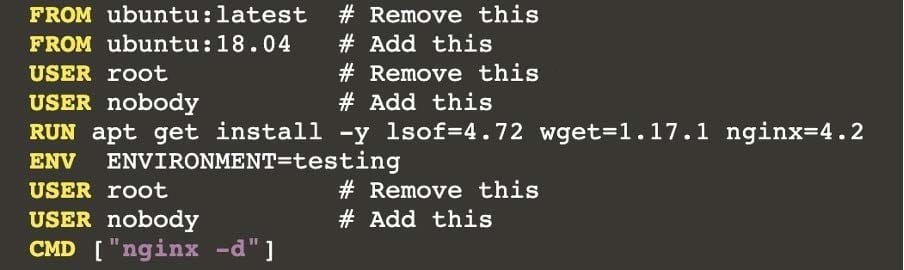
Analyse and edit the given Dockerfile (based on the ubuntu:18:04 image)
/home/cert_masters/Dockerfile fixing two instructions present in the file being prominent security/best-practice issues.
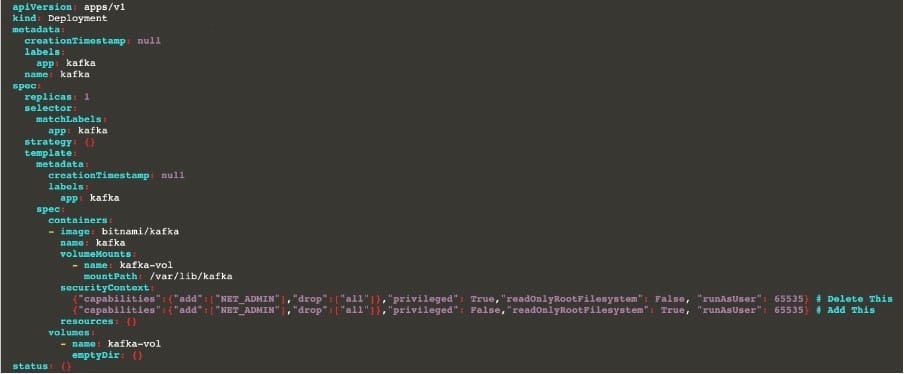
Analyse and edit the given manifest file
/home/cert_masters/mydeployment.yaml fixing two fields present in the file being prominent security/best-practice issues.
Note: Don't add or remove configuration settings; only modify the existing configuration settings, so that two configuration settings each are no longer security/best-practice concerns.
Should you need an unprivileged user for any of the tasks, use user nobody with user id 65535
A. See the explanation below
B. PlaceHolder

1.
Retrieve the content of the existing secret named default-token-xxxxx in the testing namespace.
Store the value of the token in the token.txt
2.
Create a new secret named test-db-secret in the DB namespace with the following content:
username: mysql password: password@123
Create the Pod name test-db-pod of image nginx in the namespace db that can access test-db-secret via a volume at path /etc/mysql-credentials
A. See the explanation below:
B. PlaceHolder
Cluster: dev Master node: master1 Worker node: worker1 You can switch the cluster/configuration context using the following command: [desk@cli] $ kubectl config use-context dev Task:
Retrieve the content of the existing secret named adam in the safe namespace.
Store the username field in a file names /home/cert-masters/username.txt, and the password field in a file named /home/cert-masters/password.txt.
1.
You must create both files; they don't exist yet.
2.
Do not use/modify the created files in the following steps, create new temporary files if needed.
Create a new secret names newsecret in the safe namespace, with the following content:
Username: dbadmin Password: moresecurepas
Finally, create a new Pod that has access to the secret newsecret via a volume:
Namespace:safe Pod name:mysecret-pod Container name:db-container Image:redis Volume name:secret-vol Mount path:/etc/mysecret
A. See the explanation below
B. PlaceHolder
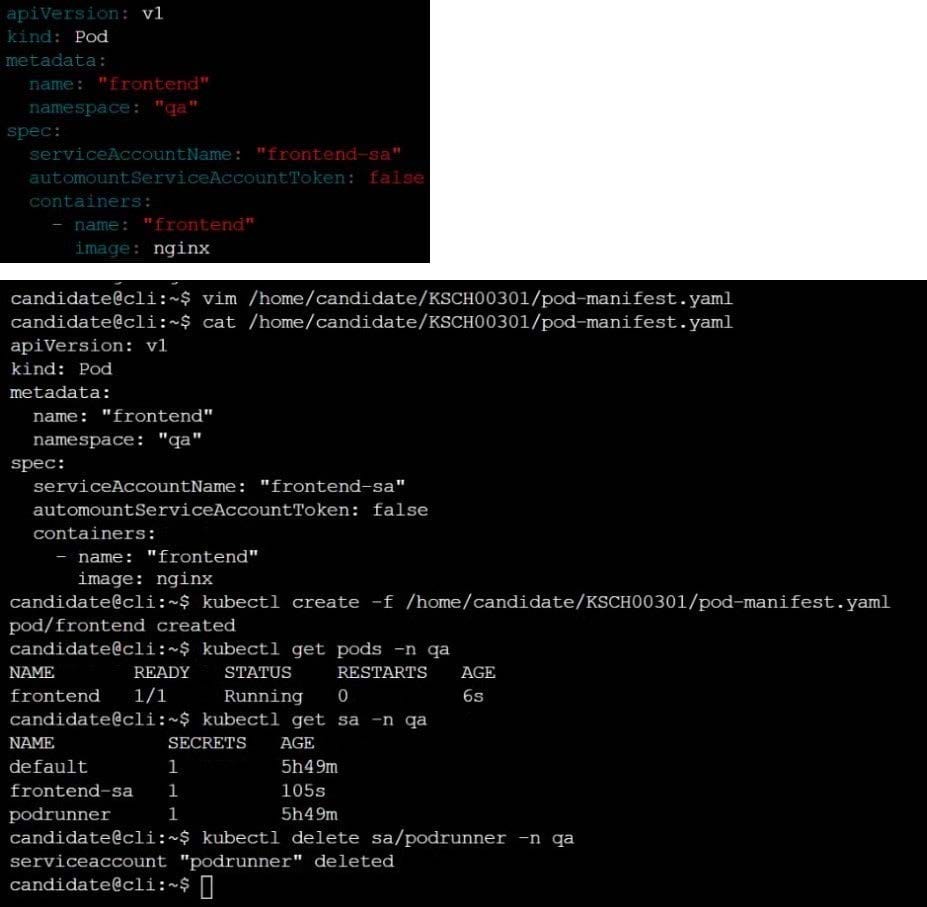
You can switch the cluster/configuration context using the following command:
[desk@cli] $ kubectl config use-context stage
Context:
A PodSecurityPolicy shall prevent the creation of privileged Pods in a specific namespace.
Task:
1.
Create a new PodSecurityPolcy named deny-policy, which prevents the creation of privileged Pods.
2.
Create a new ClusterRole name deny-access-role, which uses the newly created PodSecurityPolicy deny-policy.
3.
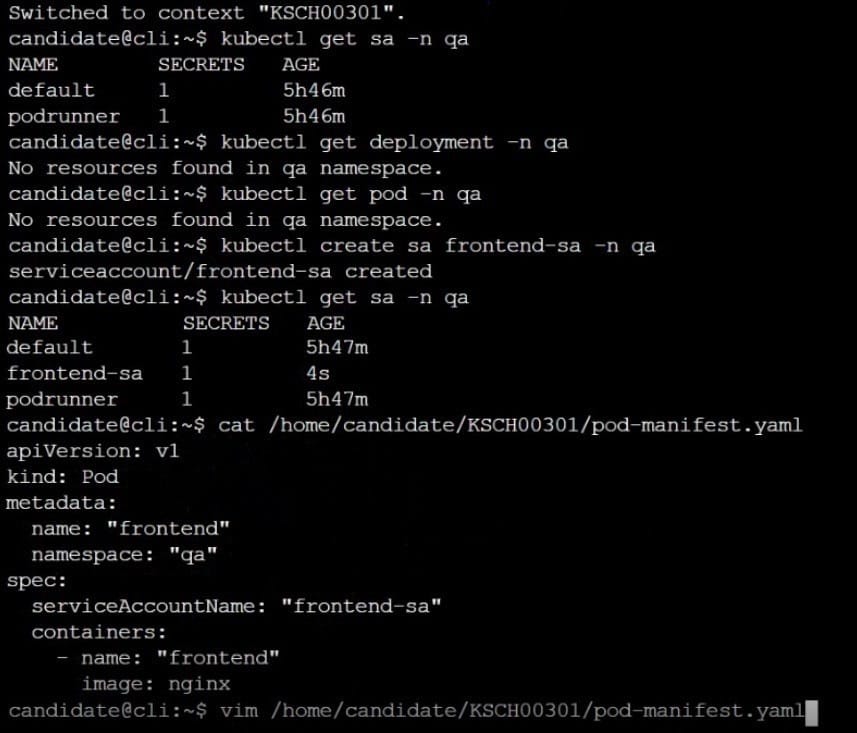
Create a new ServiceAccount named psd-denial-sa in the existing namespace development.
Finally, create a new ClusterRoleBindind named restrict-access-bind, which binds the newly created ClusterRole deny-access-role to the newly created ServiceAccount psp-denial-sa
A. See the explanation below
B. PlaceHolder
Create a User named john, create the CSR Request, fetch the certificate of the user after approving it.
Create a Role name john-role to list secrets, pods in namespace john
Finally, Create a RoleBinding named john-role-binding to attach the newly created role john-role to the user john in the namespace john.
To Verify: Use the kubectl auth CLI command to verify the permissions.
A. See the below.
B. PlaceHolder
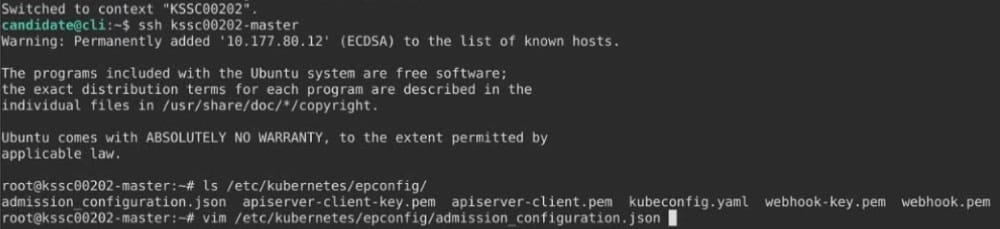
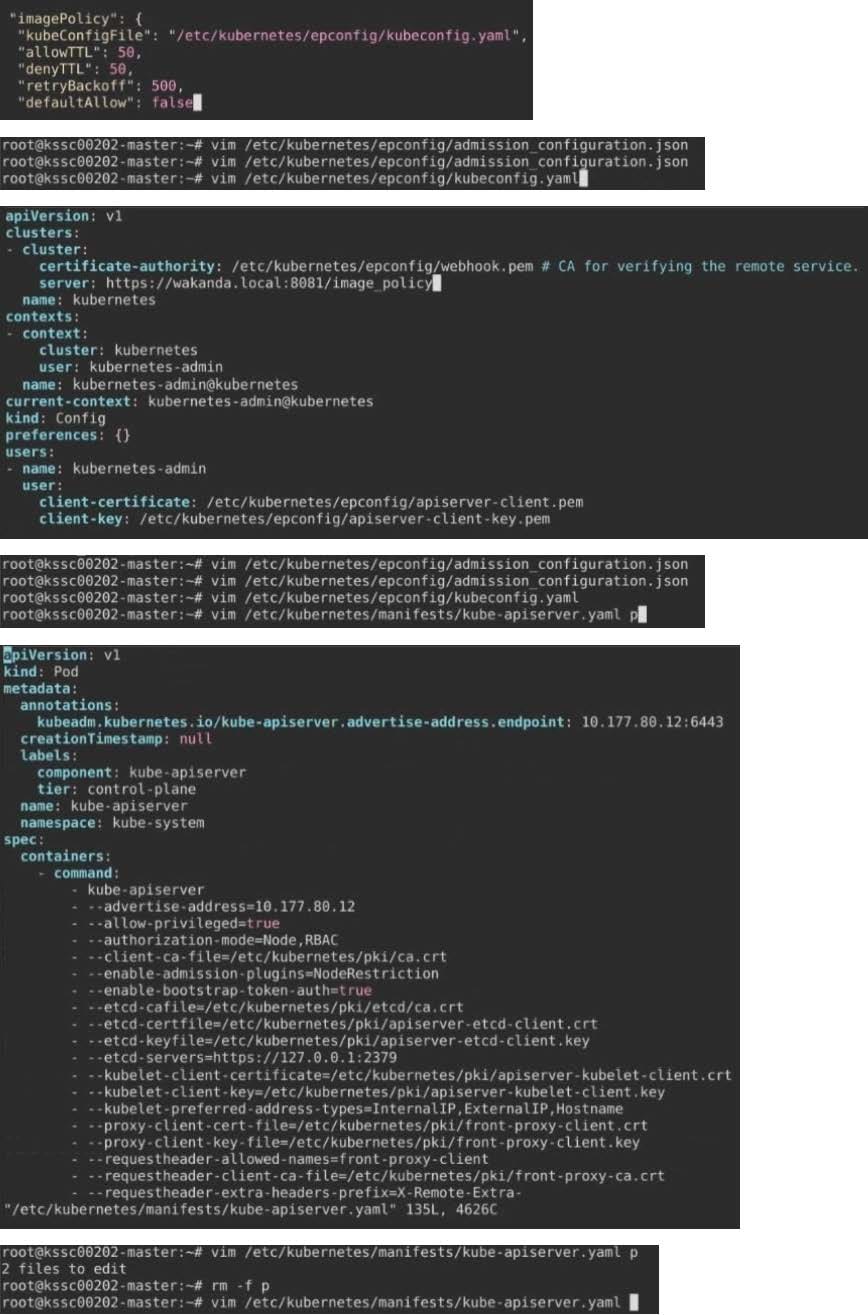
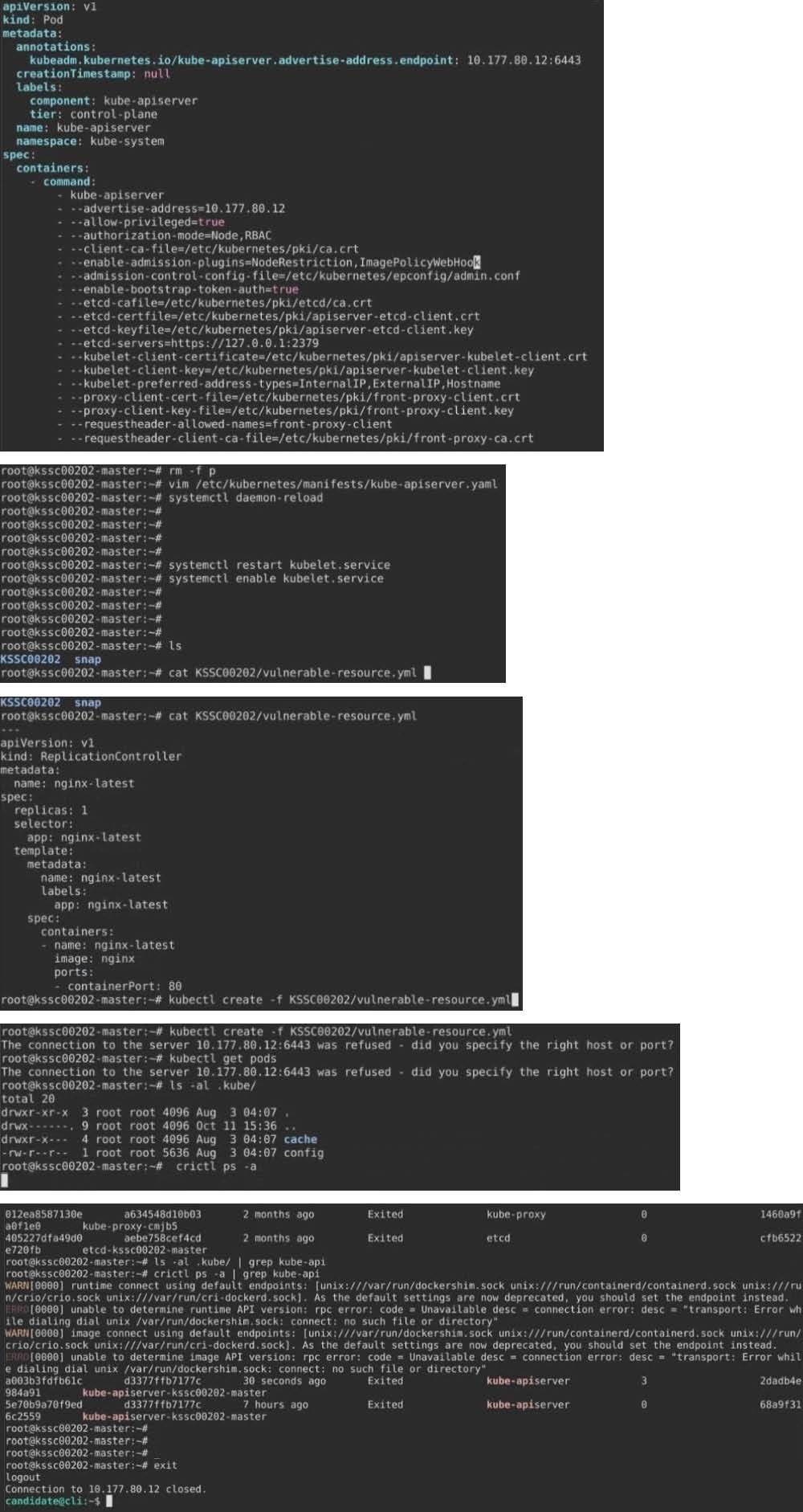
A container image scanner is set up on the cluster.
Given an incomplete configuration in the directory
/etc/kubernetes/confcontrol and a functional container image scanner with HTTPS endpoint https://test-server.local.8081/image_policy
1.
Enable the admission plugin.
2.
Validate the control configuration and change it to implicit deny.
Finally, test the configuration by deploying the pod having the image tag as latest.
A. See explanation below.
B. PlaceHolder

Home | Contact Us | About Us | FAQ | Guarantee & Policy | Privacy & Policy | Terms & Conditions | How to buy
Copyright © 2026 pass4itsure.com. All Rights Reserved