 TESTED 07 Jul
MD-102 Online Practice Questions and Answers
You have an Azure AD group named Group1. Group1 contains two Windows 10 Enterprise devices named Device1 and Device2.
You create a device configuration profile named Profile1. You assign Profile1 to Group1.
You need to ensure that Profile1 applies to Device1 only.
What should you modify in Profile1?
A. Assignments
B. Settings
C. Scope (Tags)
D. Applicability Rules
You have a Microsoft 365 E5 subscription that contains 1,000 Windows 11 devices. All the devices are enrolled in Microsoft Intune.
You plan to integrate Intune with Microsoft Defender for Endpoint.
You need to establish a service-to-service connection between Intune and Defender for Endpoint.
Which settings should you configure in the Microsoft Intune admin center?
A. Premium add-ons
B. Connectors and tokens
C. Tenant enrollment
D. Microsoft Tunnel Gateway
Your company uses Microsoft Intune.
More than 500 Android and iOS devices are enrolled in the Intune tenant.
You plan to deploy new Intune policies. Different policies will apply depending on the version of Android or iOS installed on the device.
You need to ensure that the policies can target the devices based on their version of Android or iOS.
What should you configure first?
A. groups that have dynamic membership rules in Azure AD
B. Device categories in Intune
C. Corporate device identifiers in Intune
D. Device settings in Azure AD
You use a Microsoft Intune subscription to manage iOS devices.
You configure a device compliance policy that blocks jailbroken iOS devices.
You need to enable Enhanced jailbreak detection.
What should you configure?
A. the Compliance policy settings
B. the device compliance policy
C. a network location
D. a configuration profile
You have a Microsoft 365 Subscription that uses Microsoft Intune. You add apps to Intune as shown in the following table.
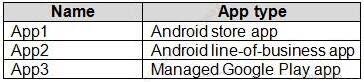
You need to create an app configuration policy named Policy1 for the Android Enterprise platform. Which apps can you manage by using Policy1?
A. App2 only
B. App3 only
C. App1 and App3 only
D. App2 and App3 only
E. App1, App2, and App3
You have a Microsoft 365 subscription that uses Microsoft Intune.
You need to ensure that you can deploy apps to Android Enterprise devices.
What should you do first?
A. Create a configuration profile.
B. Add a certificate connector.
C. Configure the Partner device management settings.
D. Link your managed Google Play account to Intune.
You have a computer named Computer1 that runs Windows 10.
You need to configure User Account Control (UAC) to prompt administrators for their credentials.
Which settings should you modify?
A. Administrators Properties in Local Users and Groups
B. User Account Control Settings in Control Panel
C. Security Options in Local Group Policy Editor
D. User Rights Assignment in Local Group Policy Editor
You manage 1,000 computers that run Windows 10. All the computers are enrolled in Microsoft Intune. You manage the servicing channel settings of the computers by using Intune.
You need to review the servicing status of a computer.
What should you do?
A. From Device configuration - Profiles, view the device status.
B. From Software updates, view the Per update ring deployment state.
C. From Software updates, view the audit logs.
D. From Device compliance, view the device compliance.
Your network contains an Active Directory domain. The domain contains a computer named Computer1 that runs Windows 8.1.
Computer1 has apps that are compatible with Windows 10.
You need to perform a Windows 10 in-place upgrade on Computer1.
Solution: You copy the Windows 10 installation media to a network share. You start Computer1 from Windows PE (WinPE), and then you run setup.exe from the network share.
Does this meet the goal?
A. Yes
B. No
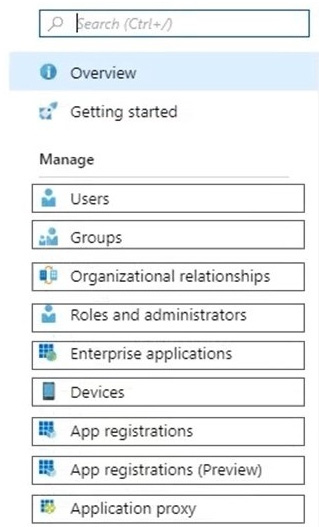
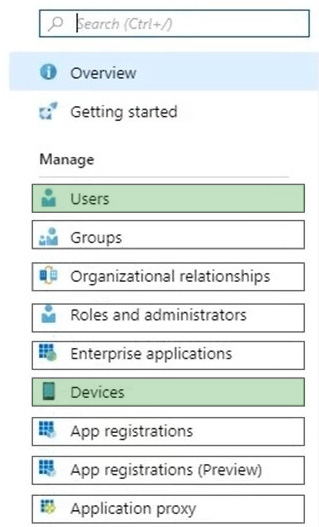
HOTSPOT
You need to meet the technical requirements for Windows AutoPilot.
Which two settings should you configure from the Azure Active Directory blade? To answer, select the appropriate settings in the answer area.
NOTE: Each correct selection is worth one point.
Hot Area:

Home | Contact Us | About Us | FAQ | Guarantee & Policy | Privacy & Policy | Terms & Conditions | How to buy
Copyright © 2026 pass4itsure.com. All Rights Reserved