 TESTED 13 Jul
E20-307 Online Practice Questions and Answers
DRAG DROP
When using the SRDF failover command for a maintenance operation, what is the correct sequence of the steps necessary to provide a consistent point-in-time copy with minimal recovery at the target side?
Select and Place:


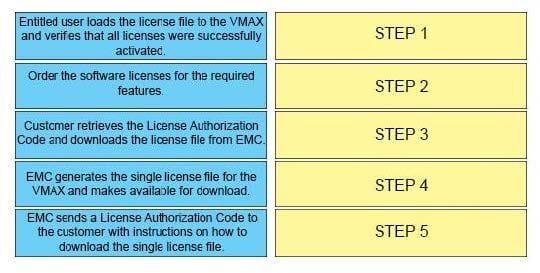
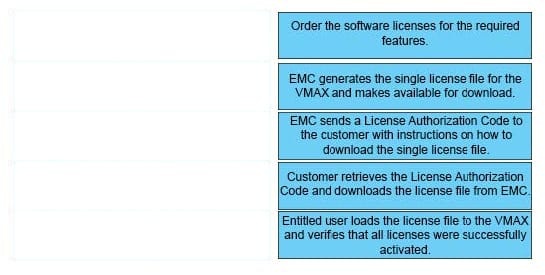
DRAG DROP
What is the correct sequence of steps to obtain VMAX licenses and ensure the VMAX is configured to allow these features to work properly?
Select and Place:
Which type of emulation is used for thin devices provisioned to an eNAS Storage Group in VMAX3?
A. EMBEDDED_NAS_FBA
B. FBA
C. CELERRA_FBA
D. eNAS_FBA
VMAX3 devices 00011 through 00014 are 100 GB in size. What will the size of the devices be after the symdev modify –devs 00011:00014 –cap 400 –captype gb –tdev SYMCLI command is executed?
A. 200 GB
B. 400 GB
C. 500 GB
D. 1600 GB
Please enter your Powerlink Username below. If you do not have a Powerlink Username or do not know your Powerlink Username enter none. Powerlink Username:
A. Varies
In a Unisphere for VMAX remote deployment, Unisphere cannot discover any storage arrays. What could be causing this issue?
A. An FC configuration or SAN issue on or between the Unisphere client and the SYMAPI server may exist.
B. An IP configuration or LAN issue on or between the Unisphere server and the SYMAPI server may exist.
C. Unisphere server is not directly connected to a VMAX3.
D. Unisphere client is not directly connected to a VMAX3.
Which Database Management System(s) is used by Unisphere for VMAX v.8.3?
A. Oracle
B. PostgreSQL and MySQL
C. MySQL only
D. PostgreSQL only
What is the distance limit for SRDF/S remote replication?
A. 60 miles / 96 km
B. 100 miles / 160 km
C. 125 miles / 200 km
D. 200 miles / 320 km
What are the pre-configured devices used by the VMAX3 Data Services Hypervisor VM?
A. RDF1+TDEV
B. BCV+TDEV
C. INT+TDEV D. TDEV
From an application perspective, what should be done prior to performing an SRDF Restore operation?
A. Continue accessing the R1 and R2 devices
B. Continue accessing the R1 devices. Stop accessing the R2 devices
C. Stop accessing the R1 devices. Continue accessing the R2 devices
D. Stop accessing the R1 and R2 devices

Home | Contact Us | About Us | FAQ | Guarantee & Policy | Privacy & Policy | Terms & Conditions | How to buy
Copyright © 2026 pass4itsure.com. All Rights Reserved