 TESTED 23 Jun
9L0-420 Online Practice Questions and Answers
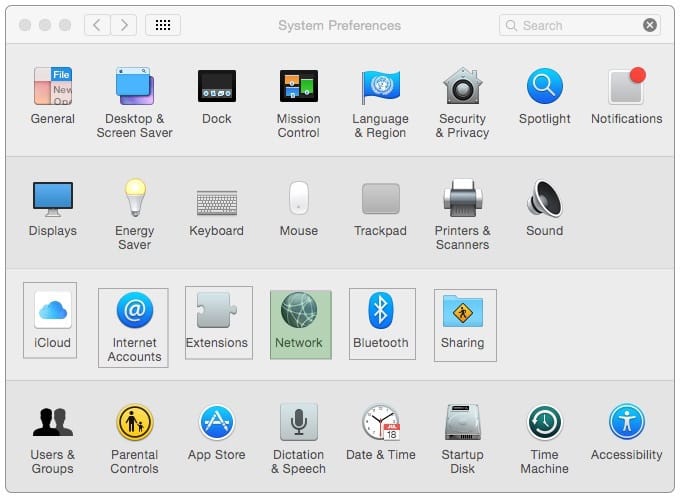
In the screenshot, click the icon of the preference pane where you can enable Windows users on your network to access files on your Mac.
Hot Area:
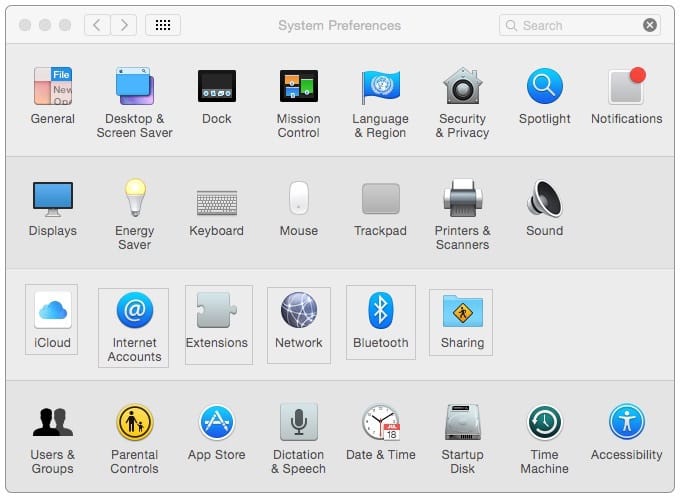
Hot Area:
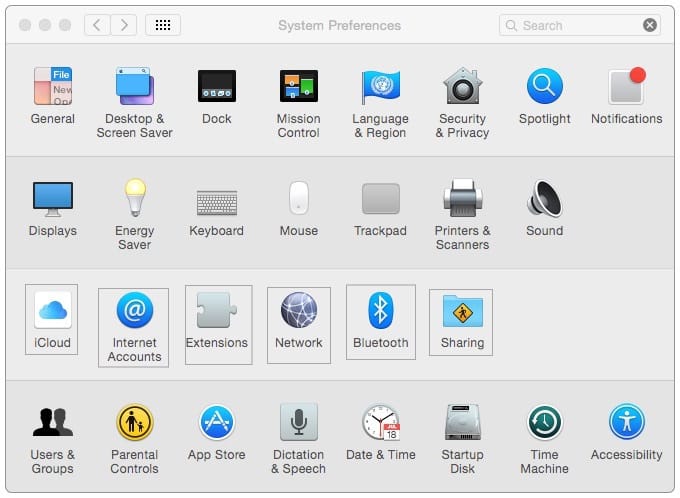
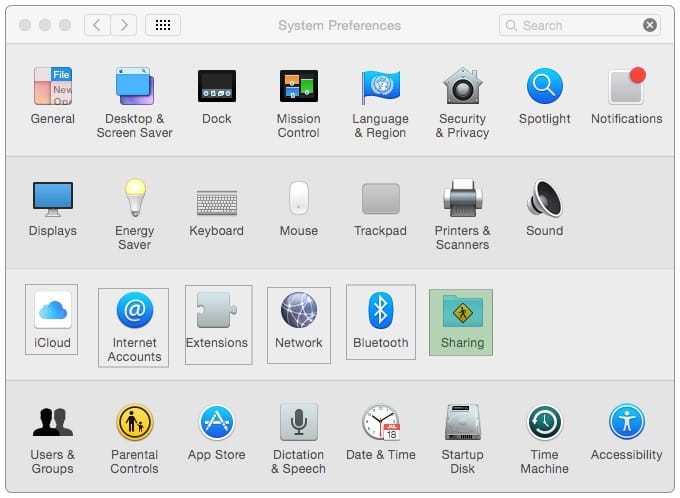
In the screenshot, click the icon of the preference pane where you configure VPN.
Hot Area:
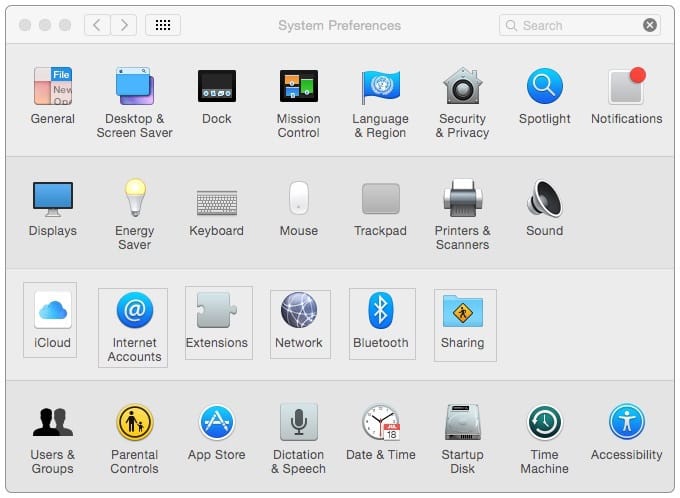
You connected a new USB hard drive to your Mac. Which action will configure Time Machine to back up your data to the USB drive?
A. Dragging the USB hard disk icon from the desktop onto the Time Machine icon in the Dock.
B. Dragging the USB hard disk icon from the desktop onto the Time Machine icon in the /Applications/ Utilities/ folder.
C. Clicking Time Machine in System Preferences, then clicking Select Backup Disk, selecting the USB hard disk, and clicking "Use Disk."
D. Clicking the Time Machine icon in the Dock, selecting the new USB hard disk as the backup destination, choosing ZIP from the Backup Format list, and clicking Start.
Which password was generated by choosing Letters and Numbers from the Type menu in Password Assistant?
A. tend13)fuser
B. htb3RL492QuB
C. 210691077647
D. }\B'h9QadW{.
A MacBook Pro with Retina display has an unknown firmware password. How can you reset the password?
A. Turn off the MacBook Pro, open it and change the configuration of its physical memory modules, then close it and turn it on again.
B. Start up the MacBook Pro from the Recovery Disk and choose Reset Firmware Password from the Utilities menu.
C. In System Preferences, click Start Up Disk, authenticate with an administrator account password, and click Reset Firmware Password.
D. Start up the MacBook Pro and click Enter Master Password at the login window, then enter the computer's master password and click Reset Firmware Password.
E. Take the MacBook Pro to an Apple Retail Store or Apple Authorized Service Provider.
Which step will prepare your computers to migrate documents from a Windows computer to a new Mac using Migration Assistant?
A. Connecting both computers to the same network
B. Starting up the Mac in target disk mode and connecting the computers with a USB cable
C. Connecting an external hard drive to the Windows computer
D. Connecting the Mac to the Windows computer with a USB cable
Which of these can you configure to access a Microsoft Exchange server computer? (Select THREE.)
A. Mail
B. Directory Utility
C. Keychain Access
D. Messages
E. Contacts
F. Calendar
Which statement accurately describes the role of FileVault?
A. FileVault encrypts the startup disk's contents.
B. FileVault keeps a journal that tracks all changes to a user's files.
C. FileVault stores a user's home folder as an encrypted disk image.
D. FileVault backs up a user's data to a specified volume on a specified schedule.
Which of these provides directory and authentication services for Windows Server?
A. Active Directory
B. LDAP Directory
C. Open Directory
D. Exchange Directory

Home | Contact Us | About Us | FAQ | Guarantee & Policy | Privacy & Policy | Terms & Conditions | How to buy
Copyright © 2026 pass4itsure.com. All Rights Reserved