 TESTED 12 Jul
9A0-142 Online Practice Questions and Answers
You are creating a document in InDesign CS5. You want to apply tags on your document.
Which of the following commands can be used to import tags? Each correct answer represents a complete solution. Choose all that apply.
A. Choose Object > Tags
B. Choose File > Import XML
C. Choose Window > Tags
D. Choose File > import
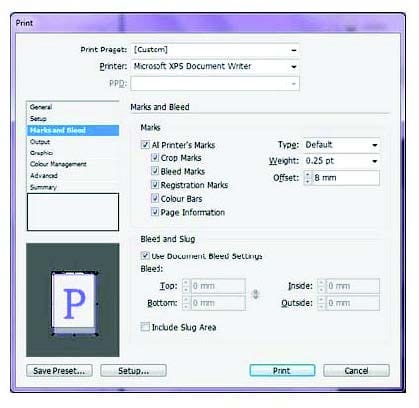
You are preparing a document for printing in InDesign CS5. Which of the following options in the Mark and Bleed pane of the Print dialog box specifies how far from the edge of the page will InDesign draw printer's marks?
A. Weight
B. Crop Marks
C. Bleed Marks
D. Offset
Which of the following is similar to EPS?
A. InDesign
B. Flash
C. Illustrator
D. Photoshop
You work as a Web Developer for company Inc. You are creating a document in InDesign CS5. You want to add imported XML data after the current data in your document.
What will you do to accomplish the task?
A. Select the Import into Selected Element Content check box in the Import XML dialog box.
B. Select the Merge Content check box in the Import XML dialog box.
C. Select the Append Content check box in the Import XML dialog box.
D. Select the Only Import Elements That Match Existing Structure check box in the Import XML dialog box.
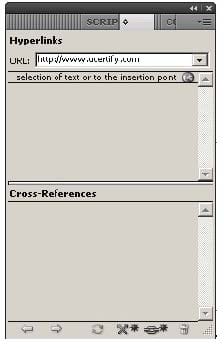
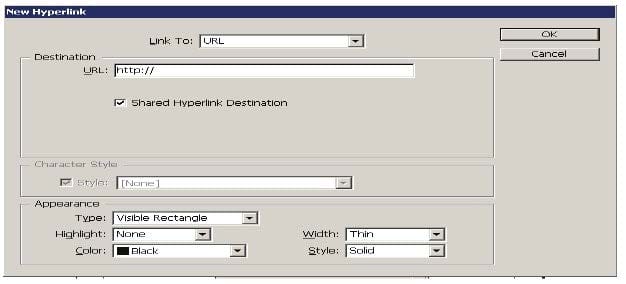
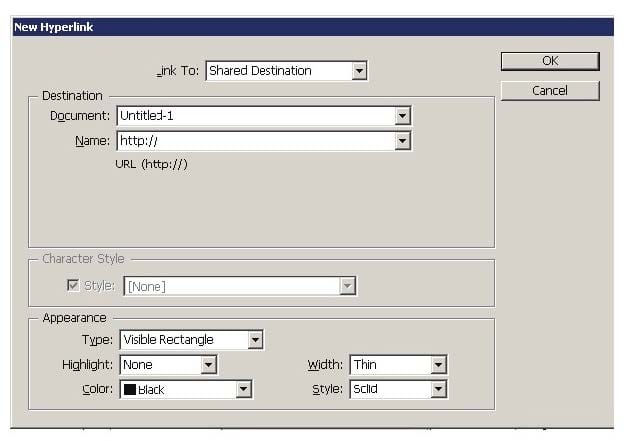
You have created a Web page using InDesign CS5 with an extensive amount of information. You want to use hyperlinks for the convenience of the users of the Website so that the users can directly get to a particular section on the current Web page.
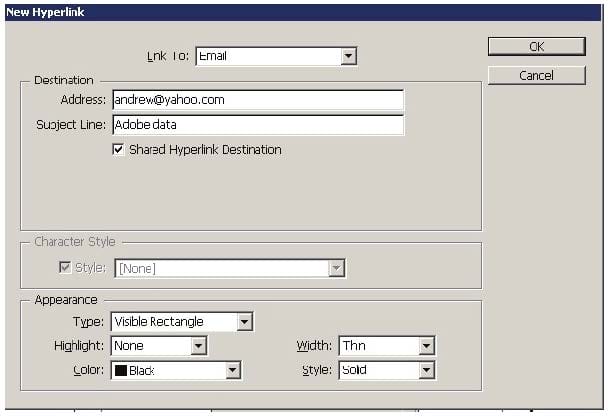
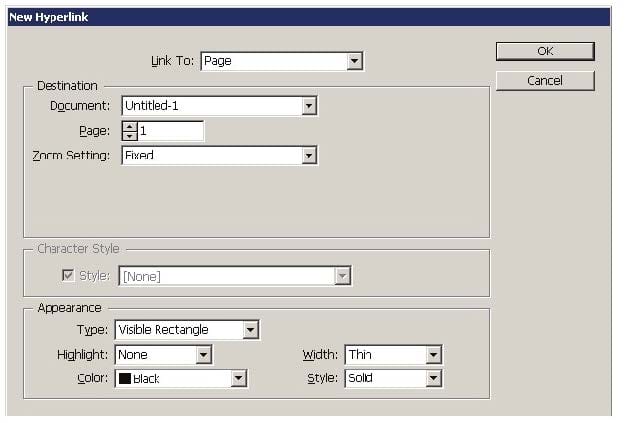
Which of the following will you specify in the 'Link To' menu of the New Hyperlink dialogue box to create hyperlinks to the Web page?
A. Shared Destination
B. Email
C. URL
D. Page
What will you do if you want to place crop marks 8 mm from the trim edge when printing?
A. Choose File > Document Setup > Click the More Options button, and enter 8 mm as the Slug value.
B. Select the All Printer's Marks checkbox in the Marks and Bleed pane of the Print Dialog Box and set the Offset field to 8 mm.
C. Uncheck Use Document Bleed Settings and enter values from 0 to 6 inches for Top, Bottom, Left, and Right for single-sided documents.
D. Uncheck Use Document Bleed Settings and enter values from 0 to 6 inches for Top, Bottom, Inside, and Outside for double-sided documents with facing pages.
You are creating a document. You have to export content of this document to an XML file. So, you are tagging page items.
Which of the following statements are true about tagging? Each correct answer represents a complete solution. Choose all that apply.
A. You cannot tag text or images on a master page.
B. You can apply only one tag to a graphics frame.
C. You cannot tag a group of objects.
D. You cannot tag a footnote
You have created a table in a document. You select the cell by pressing the Esc key to paste some data in a cell of the table. The data you are pasting has tabs and carriage returns in it.
What will happen when you paste this data to the selected cell?
A. Data will not be pasted in the cell.
B. InDesign maps the clipboard data into the cell.
C. InDesign maps the clipboard data across more than one cell.
D. InDesign maps the clipboard data across the all cells in the table.
You are creating a document. You want to export this document to XML.
Which of the following options in the General tab of the Export XML dialog box will you choose to apply a style sheet to define the transformation of the exported XML?
A. Include DTD Declaration
B. Apply XSLT
C. Export Untagged Tables As CALS XML
D. View XML Using
Which of the following are the basic rules for creating graphics files? Each correct answer represents a complete solution. Choose all that apply.
A. Bitmaps such as photos and scans should be saved in the PCX, BMP, GIF, SCT, or PICT format.
B. Line art should be saved in the EPS, PDF, Adobe Illustrator, WMF, EMF, or PICT format.
C. Line art should be saved in the PCX, BMP, GIF, or SCT format.
D. Bitmaps such as photos and scans should be saved in the TIFF, Adobe Photoshop, PNG, or JPEG format.

Home | Contact Us | About Us | FAQ | Guarantee & Policy | Privacy & Policy | Terms & Conditions | How to buy
Copyright © 2026 pass4itsure.com. All Rights Reserved