 TESTED 12 Jul
301B Online Practice Questions and Answers
An application is configured on an LTM device:
Virtual server: 10.0.0.1:80 (VLAN vlan301)
SNAT IP: 10.0.0.1
Pool members: 10.0.1.1:8080, 10.0.1.2:8080, 10.0.1.3:8080 (VLAN vlan302)
Which packet capture should the LTM Specialist perform on the LTM device command line interface to capture only client traffic specifically for this virtual server?
A. tcpdump -ni 0.0:nnn -s 0 'host 10.0.0.1' -w /var/tmp/trace.cap
B. tcpdump -ni vlan301 -s 0 'port 80 and host 10.0.0.1' -w /var/tmp/trace.cap
C. tcpdump -ni vlan301 -s 0 'port 8080 and host 10.0.1.1 or host 10.0.1.2 or host 10.0.1.3' -w /var/tmp/trace.cap
D. tcpdump -ni vlan302 -s 0 'port 8080 and host 10.0.1.1 or host 10.0.1.2 or host 10.0.1.3' -w /var/tmp/trace.cap
E. tcpdump -ni 0.0:nnn -s 0 '(port 80 and host 10.0.0.1) or (port 8080 and host 10.0.1.1 or host 10.0.1.2 or host 10.0.1.3)' -w /var/tmp/trace.cap
An LTM Specialist is investigating reports from users that SSH connections are being terminated unexpectedly. SSH connections are load balanced through a virtual server. The users experiencing this problem are running SQL queries that take upwards of 15 minutes to return with no screen output. The virtual server is standard with a pool associated and no other customizations.
What is causing the SSH connections to terminate?
A. UDP IP ToS
B. TCP idle timeout
C. The virtual server has no persistence.
D. The pool has Reselect Retries set to 0.
An LTM device is serving an FTP virtual server that has three pool members. The FTP pool members are monitored via TCP port 21. Customers are reporting that they are able to log in, but are sometimes unable to upload files to the server. Which monitor should the LTM Specialist configure to verify that the servers can handle file uploads?
A. FTP
B. Inband
C. External
D. Scripted
E. Real Server
There are three servers in the pool: 172.16.20.1, 172.16.20.2, and 172.16.20.3, with the virtual IP address 10.0.20.88.
A user CANNOT connect to an HTTP application. To understand the problem and find a solution, the LTM Specialist runs two concurrent traces on the LTM device, with the following results:
Trace on client side:
tcpdump: verbose output suppressed, use -v or -vv for full protocol decode
listening on 0.0, link-type EN10MB (Ethernet), capture size 96 bytes
22:22:07.423759 IP 172.16.20.100.53875 > 10.0.20.88.80: S 998346084:998346084(0) win 5840
22:22:07.424056 IP 10.0.20.88.80 > 172.16.20.100.53875: S 4671780:4671780(0) ack 998346085 win 4380
22:22:07.424776 IP 172.16.20.100.53875 > 10.0.20.88.80: . ack 1 win 365
22:22:07.424790 IP 172.16.20.100.53875 > 10.0.20.88.80: P 1:149(148) ack 1 win 365
22:22:07.424891 IP 10.0.20.88.80 > 172.16.20.100.53875: . ack 149 win 4528
22:22:12.024850 IP 10.0.20.88.80 > 172.16.20.100.53875: R 1:1(0) ack 149 win 4528
6 packets captured
6 packets received by filter
0 packets dropped by kernel
Trace on server side:
tcpdump: verbose output suppressed, use -v or -vv for full protocol decode
listening on internal, link-type EN10MB (Ethernet), capture size 96 bytes
22:22:07.424881 IP 172.16.20.100.53875 > 172.16.20.2.80: S 51116678:51116678(0) win 4380
22:22:08.424893 IP 172.16.20.100.53875 > 172.16.20.2.80: S 51116678:51116678(0) win 4380
22:22:09.625082 IP 172.16.20.100.53875 > 172.16.20.2.80: S 51116678:51116678(0) win 4380
22:22:10.825194 IP 172.16.20.100.53875 > 172.16.20.2.80: S 51116678:51116678(0) win 4380
4 packets captured
4 packets received by filter
0 packets dropped by kernel
What should the LTM Specialist do to solve the problem?
A. Edit the packet filter rules.
B. Modify the monitor of the pool.
C. Enable the virtual server.
D. Configure the virtual server to use SNAT.
An LTM Specialist is troubleshooting a problem on an eCommerce website. The user browses the online store using port 80, adding items to the shopping cart. The user then clicks the "Checkout" button on the site, which redirects the user to port 443 for the checkout process. Suddenly, the user's shopping cart is shown as empty. The shopping cart data is stored in memory on the server, and the default source address persistence profile is used on both virtual servers.
What is the issue?
A. The port 80 pool member is deleting the user's session cookie.
B. The port 443 pool member is deleting the user's session cookie.
C. The port 80 and port 443 connections are balanced to the same node.
D. The port 80 and port 443 connections are balanced to different nodes.
While investigating the cause of a device failover, an LTM Specialist discovers the following events in /var/log/ltm:
01010029:5: Clock advanced by 518 ticks 01010029:5: Clock advanced by 505 ticks 01010029:5: Clock advanced by 590 ticks 01010029:5: Clock advanced by 568 ticks 01010029:5: Clock advanced by 1681 ticks 01010029:5: Clock advanced by 6584 ticks 01140029:5: HA daemon_heartbeat tmm fails action is failover and restart. 010c0026:5: Failover condition, active attempting to go standby.
Which issue caused the failover?
A. NTP being out of sync
B. TMM being descheduled
C. VLAN Fail-safe heartbeats
D. HA missing heartbeat packets
An HA pair of LTM devices configured in Active-Standby mode stops responding to traffic and causes an outage. The Active device becomes Standby, but the partner device stays in Standby mode instead of taking over as Active. A reboot and restart of the services brings the LTM device to Active mode for a short time, but then it goes into Standby mode again.
Which two configuration components caused this condition? (Choose two.)
A. VLAN Fail-safe
B. System Fail-safe
C. Gateway Fail-safe
D. Switch Board Failure
E. Link down on Failover
-- Exhibit
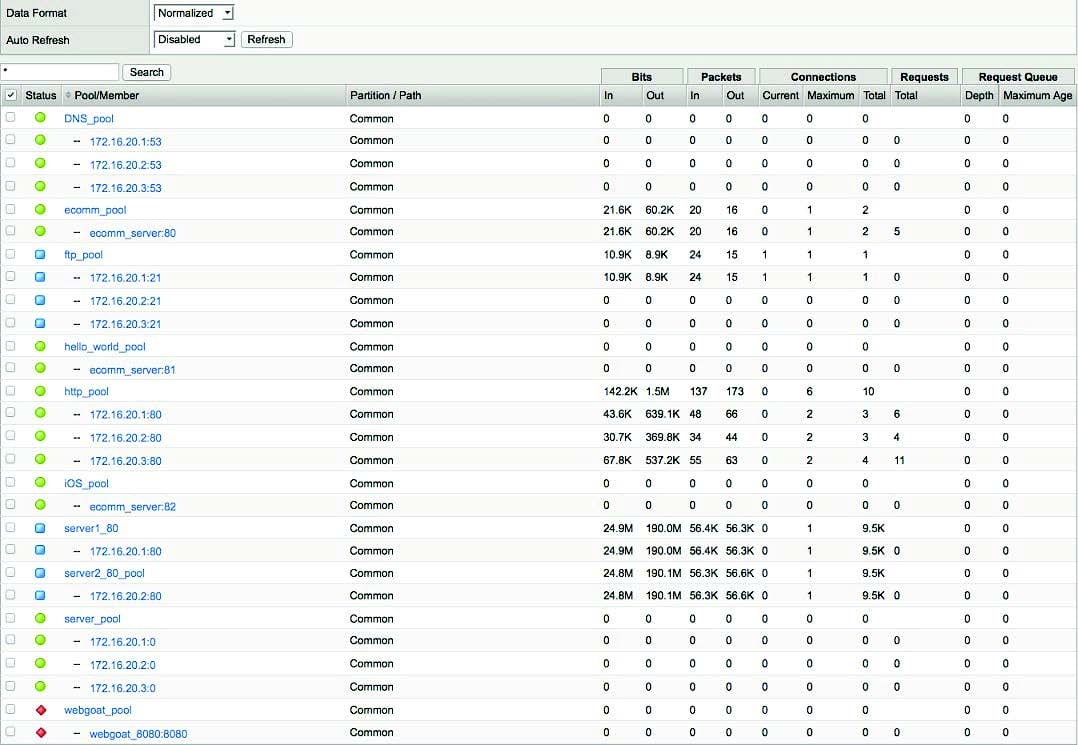
-- Exhibit -Refer to the exhibit.
Which pool can be removed without affecting client traffic?
A. ftp_pool
B. http_pool
C. server1_80
D. server_pool
-- Exhibit
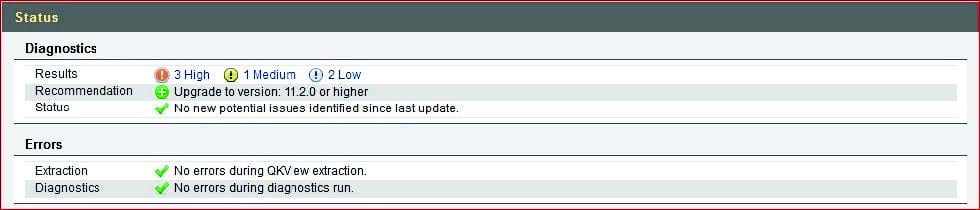
-- Exhibit -Refer to the exhibit.
Which step should an LTM Specialist take next to finish upgrading to HD1.3?
A. Install image to HD1.3
B. Install hotfix to HD1.3
C. Activate HD1.3
D. Relicense HD1.3
-- Exhibit
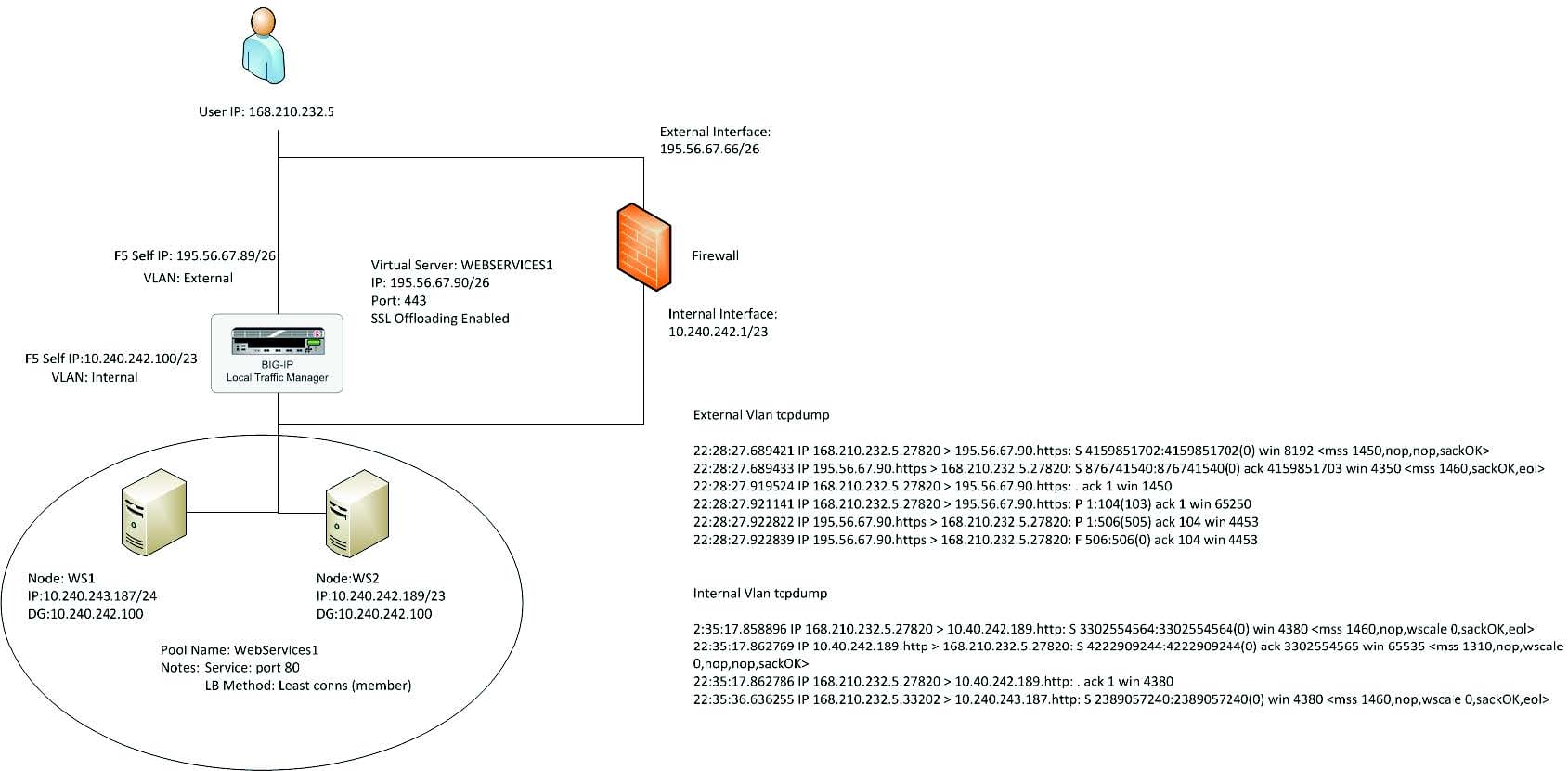
-- Exhibit -Refer to the exhibit.
An LTM Specialist has a virtual server set up on the LTM device as per the exhibit. The LTM Specialist receives reports of intermittent issues. Some clients are connecting fine while others are failing to connect.
The LTM Specialist does a tcpdump on the relevant interfaces, with the following results extracted:
What is causing the intermittent issues?
A. The firewall is dropping the packets from WS1.
B. The default gateway is inaccessible from WS1.
C. The load balancing (LB) method is inappropriate.
D. The pool members have been set up as an active/standby pair, with WS1 as the standby.

Home | Contact Us | About Us | FAQ | Guarantee & Policy | Privacy & Policy | Terms & Conditions | How to buy
Copyright © 2026 pass4itsure.com. All Rights Reserved