 TESTED 12 Jul
156-915.65 Online Practice Questions and Answers
In New Mode HA, the internal cluster IP VIP address is 10.4.8.3. The internal interfaces on two members are 10.4.8.1 and 10.4.8.2. Internal host 10.4.8.108 Pings 10.4.8.3, and receives replies. The following is the ARP table from the internal Windows host 10.4.8.108:According to the output, which member is the standby machine?
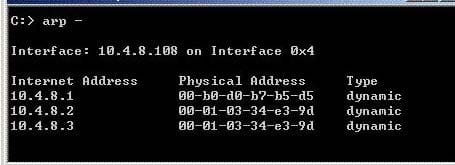
A. 10.4.8.1
B. The standby machine cannot be determined by this test.
C. 10.4.8.2
D. 10.4.8.3
SmartDefense profiles are:
A. Files that take 3MB of RAM from the user console machine.
B. Able to be cloned, but only from the command line.
C. Configurable up to 20 for all VPN-1 R65 Gateways and above.
D. Configurable from either the SmartDefense tab or from the Gateway itself.
How does a standby SmartCenter Server receive logs from all Security Gateways, when an active SmartCenter Server fails over?
A. Establish Secure Internal Communications (SIC) between the primary and secondary Servers. The secondary Server can then receive logs from the Gateways, when the active Server fails over.
B. Add the secondary SmartCenter Server object as a backup log server in the "Log Servers" window (under the "Logs and Masters" tab on the Gateway object). Reinstall the Security Policy.
C. The secondary Server's host name and IP address must be added to the Masters file on the remote Gateways.
D. Create a Check Point host object to represent the standby SmartCenter Server. Then select "Secondary SmartCenter Server" and "Log Server", from the list of Check Point Products on the General Properties window.
In a Management High Availability (HA) configuration, you can configure synchronization to occur automatically, when
(1)The Security Policy is installed.
(2)The Security Policy is saved.
(3)The Security Administrator logs in to the secondary SmartCenter Server, and changes its status to active.
(4)A scheduled event occurs.
(5)The
user database is installed.
Select the BEST response for the synchronization sequence. Choose One:
A.
1,2,3,4
B.
1,2,5
C.
1,2,4
D.
1,3,4
The Check Point Security Gateway's virtual machine (kernel) exists between which two layers of the OSI model?
A. Physical and Data Link layers
B. Application and Presentation layers
C. Network and Data Link layers
D. Session and Network layers
You have a High Availability ClusterXL configuration. Machines are not synchronized. What happens to connections on failover?
A. It is not possible to configure High Availability that is not synchronized.
B. Connections cannot be established until cluster members are fully synchronized.
C. Old connections are lost but can be reestablished.
D. Old connections are lost and but are automatically recovered whenever the failed machine recovers.
When configuring VPN High Availability (HA) with MEP, which of the following is correct?
A. The decision on which MEP Security Gateway to use is made on the remote gateway's side (non-MEP side).
B. MEP Gateways must be managed by the same SmartCenter Server.
C. MEP VPN Gateways cannot be geographically separated machines.
D. If one Gateway fails, the synchronized connection fails over to another Gateway and the connection continues
SmartView Tracker logs the following Security Administrator activities, EXCEPT
A. Administrator login and logout.
B. Object creation, deletion, and editing.
C. Tracking SLA compliance.
D. Rule Base changes.
When synchronizing clusters, which of the following statements is NOT true?
A. User Authentication connections will be lost by the cluster.
B. Only cluster members running on the same OS platform can be synchronized.
C. In the case of a failover, accounting information on the failed member may be lost despite a properly working synchronization
D. An SMTP resource connection using CVP will be maintained by the cluster.
You plan to migrate an NG with Application Intelligence (Al) R55 SmartCenter Server on Windows to VPN1 NGX R65. You also plan to upgrade four VPN-1 Pro Gateways at remote offices, and one local VPN-1 Pro Gateway at your company's headquarters. The SmartCenter Server configuration must be migrated. What is the correct procedure to migrate the configuration?
A. 1. Upgrade the five remote Gateways via SmartUpdate.
2. Upgrade the SmartCenter Server, using the NGX R65 CD.
B. 1. From the VPN-1 NGX R65 CD on the SmartCenter Server, select "Upgrade".
2.
Reboot after installation and upgrade all licenses via SmartUpdate.
3.
Reinstall all gateways using NGX R65 and install a policy.
C. 1. From the VPN-1 NGX R65 CD in the SmartCenter Server, select "Export".
2.
Install VPN-1 NGX R65 on a new PC using the option "Installation using imported configuration".
3.
Reboot after installation and upgrade all licenses via SmartUpdate.
4.
Upgrade software on all five remote Gateways via SmartUpdate.
D. 1. Copy the $FWDIR\conf directory from the SmartCenter Server.
2.
Save directory contents to another file server.
3.
Uninstall the SmartCenter Server, and install a new SmartCenter Server.
4.
Move the saved directory contents to $FWDIR\conf replacing the default installation files.
5.
Reinstall all gateways using VPN-1 NGX R65 and install a Security Policy.

Home | Contact Us | About Us | FAQ | Guarantee & Policy | Privacy & Policy | Terms & Conditions | How to buy
Copyright © 2026 pass4itsure.com. All Rights Reserved